You’ve probably filled out a form that felt like it knew you.
You picked “I’m a renter,” and the next questions were about your landlord — not your mortgage.
You answered “no” to a screening question, and the form quietly skipped the next ten irrelevant ones. That invisible bit of intelligence is conditional logic, and it’s one of the most underused tools in form design.
If a regular form is a textbook — every reader gets the same chapters in the same order — a form with conditional logic is a choose your own adventure novel.
It adapts to what you say.
It only shows you the questions that actually match your situation, and skips the rest.
How conditional logic actually works
At its core, conditional logic is one rule: if answer A, then do B.
That “do B” can mean show a question, hide a question, jump to a different section, or even change which thank-you screen the respondent lands on.
Here’s what the simplest version looks like:
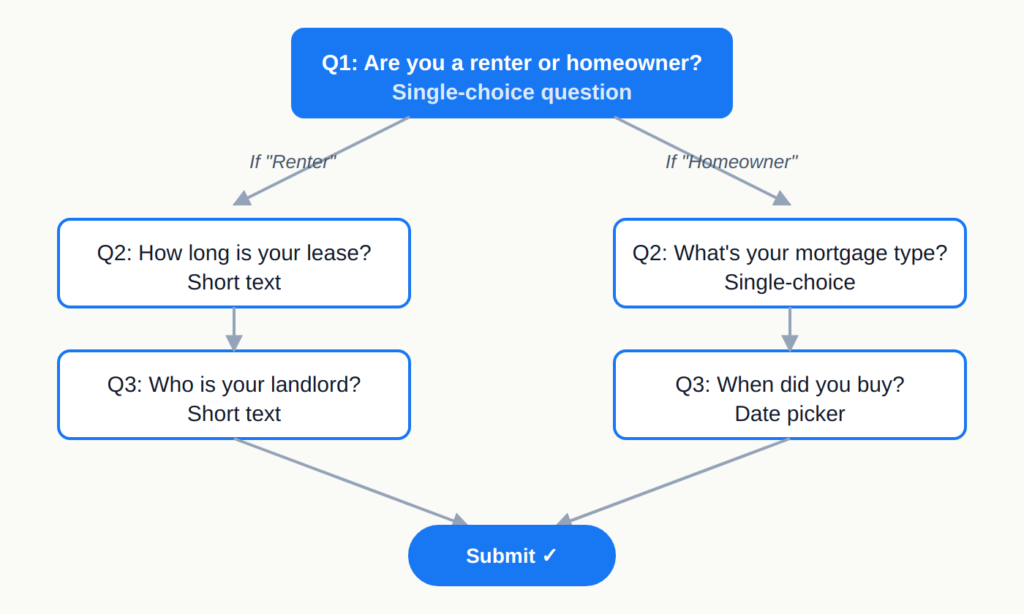
One question, two paths, two completely different follow-ups.
You don’t write code for any of this — modern form builders let you set up rules with dropdowns: “If Question 1 = ‘Renter,’ show Question 2A. Otherwise, show Question 2B.” That’s the entire grammar.
The simplest version is show/hide — a question appears or disappears based on an earlier answer.
More advanced flavors include skip logic (jumping past entire sections), piping (using an earlier answer inside a later question), and calculated fields (running scores or eligibility checks in the background).
Most teams feel a real difference with just the first two.
Three quick examples
The best way to understand conditional logic is to see it doing actual work.
Here are three forms you’ve probably encountered — or built — where logic was carrying the weight.
1. Lead generation: qualifying without scaring people off
Picture a “Request a demo” form with no logic: name, email, company size, role, budget, timeline, use case, current tool.
Twelve fields. Half of them won’t apply to a given visitor, and a lot of people quit before submitting.
With conditional logic, the form opens with one question: Are you evaluating for yourself or a team? If they pick “myself,” it asks two more questions and ends.
If they pick “a team,” it branches into the qualifying questions sales actually cares about — company size, decision timeline, current stack.
Same form, two paths.
Marketing gets richer data on real prospects, and tire-kickers don’t get punished with an interrogation. Cutting irrelevant questions is also one of the most reliable ways to reduce form abandonment.
2. HR onboarding: one form for every kind of new hire
A new-hire intake form has to handle a lot of edge cases.
Full-time employees need tax forms and benefits enrollment.
Contractors need a W-9 (or local equivalent) and an NDA.
Interns need a different set entirely.
Without logic, HR ends up running three separate forms — or worse, one bloated form where everyone wades through fields that don’t apply.
Conditional logic collapses all three into a single intake.
Question one: What’s your employment type?
Based on the answer, the form unlocks the right document uploads, asks the right tax questions, and routes the submission to the right person internally.
New hires see only what’s relevant to them, and HR gets clean, consistent data on the back end.
3. Customer feedback: digging deeper, only when it matters
A standard feedback survey often opens with a satisfaction score. Most people give a 7 or 8 and move on — fine.
But the gold is in the 1s, 2s, and 10s, where you find out what’s broken and what’s working.
With conditional logic, you ask “How satisfied are you?” and then branch:
- Score of 1–3: “What went wrong? What should we have done differently?”
- Score of 4–7: “What’s one thing we could improve?”
- Score of 8–10: “What did you love? Mind if we share this as a quote?”
Three audiences, three different conversations, all inside one form.
Happy customers stay happy (no annoying complaint questions).
Unhappy customers feel heard.
And you collect testimonials and detractor signals in the same flow.
Now that you know what it is
Conditional logic isn’t a feature you toggle on and off — it’s a design choice that changes how your form feels.
Done well, it makes a long form feel short.
Done badly, it makes respondents feel watched.
The difference comes down to whether the next question feels earned by the previous answer.
When you’re ready to build one, two next reads:
- How to build a form with conditional logic, step by step — the actual setup: rules, branches, testing, and common gotchas.
- The complete guide to conditional logic in forms — the longer pillar piece covering skip logic, scoring, and multi-path flows.
Most modern form builders — Rowform included — ship a visual logic editor on the free plan, so you can experiment without writing a line of code.